 By
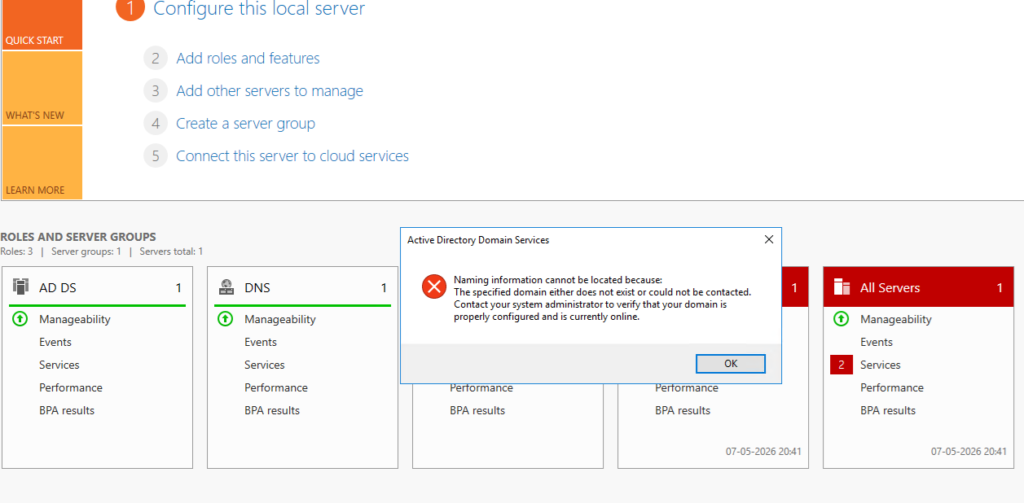
By After performing a DSRM (Directory Services Restore Mode) recovery on a Domain Controller, the server started showing the following error while opening Active Directory related consoles and Server Manager:
“Naming information cannot be located because:
The specified domain either does not exist or could not be contacted.”
At the same time:
- Active Directory tools were failing intermittently
- SYSVOL and NETLOGON shares were missing
- DNS registrations were inconsistent
- The Domain Controller was not advertising properly
This article explains the troubleshooting process and the final resolution.
Environment
- Windows Server 2016
- Single Domain Controller
- DFSR-based SYSVOL replication
- Domain:
CLASSY.COM
Initial Symptoms
The first validation was checking whether AD DS related services were running.
Verify AD DS Services
Run:
sc query ntds
sc query netlogon
sc query dns
All services were running successfully:
- NTDS
- Netlogon
- DNS
However, Active Directory still could not locate naming information correctly.
Checking SYSVOL and NETLOGON Shares
The next step was verifying whether SYSVOL and NETLOGON shares were published.
Run:
net shareOutput initially showed only default administrative shares:
C$
E$
IPC$
ADMIN$
SYSVOL and NETLOGON shares were missing.
This was the first major indication that the Domain Controller had not completed initialization after the DSRM restore.
Verifying DFSR Health
Since the environment was using DFSR for SYSVOL replication, DFSR health was checked.
Check DFSR Migration State
dfsrmig /getglobalstateOutput:
Current DFSR global state: 'Eliminated'This confirmed the server was using DFSR instead of FRS.
Check DFSR Replicated Folder State
wmic /namespace:\\root\microsoftdfs path dfsrreplicatedfolderinfo get replicationgroupname,replicatedfoldername,stateOutput:
SYSVOL Share Domain System Volume 4State 4 indicates normal DFSR replication state.
At this point:
- DFSR appeared healthy
- NTDS service was running
- DNS service was running
But SYSVOL still was not being published.
Restarting Netlogon
Netlogon was restarted to force re-publication of SYSVOL.
net stop netlogon
net start netlogon
After restarting Netlogon, net share was checked again.
Result:
- SYSVOL still missing
- NETLOGON still missing
This confirmed the issue was deeper than a simple Netlogon refresh.
Discovering the Root Cause
The next step was checking the SysVolReady registry value.
Run:
reg query "HKLM\SYSTEM\CurrentControlSet\Services\Netlogon\Parameters" /v SysVolReadyOutput:
SysVolReady REG_DWORD 0x0This was the actual root cause.
A value of 0 means:
- SYSVOL is not considered ready
- Netlogon will not publish SYSVOL/NETLOGON shares
- The Domain Controller will fail to advertise correctly
After DSRM recovery, this value had not updated automatically.
Fixing the Issue
The solution was to manually set SysVolReady to 1.
Run:
reg add "HKLM\SYSTEM\CurrentControlSet\Services\Netlogon\Parameters" /v SysVolReady /t REG_DWORD /d 1 /fThen restart Netlogon again:
net stop netlogon
net start netlogon
Verifying SYSVOL Publication
After restarting Netlogon, net share was checked once more.
net shareThis time the output correctly displayed:
NETLOGON
SYSVOL
The Domain Controller had successfully published SYSVOL and NETLOGON shares.
This immediately resolved the AD naming issue.
Running AD Health Checks
Once SYSVOL was restored, a full AD validation was performed.
Run DCDIAG
dcdiag /e /vKey results:
- Advertising → Passed
- NetLogons → Passed
- SYSVOL Check → Passed
- Replications → Passed
- LocatorCheck → Passed
Verifying Replication
repadmin /replsummaryNo replication failures were reported.
Since this was a single DC environment, replication health was effectively clean.
Verifying Domain Controller Advertisement
dcdiag /test:advertisingThe Domain Controller successfully advertised itself as:
- LDAP Server
- KDC
- Global Catalog
- Time Server
- Writable DC
Verifying DC Discovery
nltest /dsgetdc:CLASSY.COMThe command successfully returned:
- DC name
- Site name
- LDAP/KDC/GC capabilities
This confirmed the DC was fully discoverable again.
DNS Validation
Verify SRV Records
nslookup
set type=SRV
_ldap._tcp.dc._msdcs.classy.com
The SRV record correctly returned:
DC.CLASSY.COM
10.20.20.10
Re-register DNS Records
To refresh DNS registrations:
ipconfig /registerdnsThen restart Netlogon:
net stop netlogon
net start netlogon
Finally:
nltest /dsregdnsDNS registration completed successfully.
Reverse Lookup Verification
Initially, reverse lookup intermittently failed.
After DNS registration completed successfully:
nslookup 10.20.20.10Output:
Name: dc.classy.com
Address: 10.20.20.10
This confirmed both forward and reverse DNS resolution were functioning correctly.
Final Outcome
After setting SysVolReady = 1 and restarting Netlogon:
- SYSVOL share published successfully
- NETLOGON share published successfully
- Active Directory naming issues resolved
- DC advertisement restored
- DNS registrations restored
- LDAP/KDC/GC services operational
- Replication healthy
- Active Directory tools functioning normally
Important Recommendation
After a successful DSRM recovery:
- Always verify:
- SYSVOL
- NETLOGON
- DNS SRV records
- DC advertising
- Replication health
- Avoid using:
- Hyper-V checkpoints
- VMware snapshots
on Domain Controllers unless AD-safe procedures are followed.
- Take a fresh:
- System State backup
- VM backup
after recovery validation completes.
Conclusion
In this case, the Domain Controller services were running normally after DSRM recovery, but Active Directory was still non-functional because SYSVOL was not marked as ready.
The missing SYSVOL and NETLOGON shares were the key indicators.
Updating the SysVolReady registry value and restarting Netlogon restored full Domain Controller functionality successfully.